Indie devs cannot afford to outbid funded studios, so your mobile app marketing strategy has to be about getting installs through channels that keep on working after the ad budget has been completely spent. That means visibility in the app stores and on Google, and having a rating that turns impressions into installs.
Mobile app marketing strategy for organic growth: key insights
- Under 65% of App Store downloads are coming from search, so indexed listing fields are the priority after stability fixes.
- Moving an app from 3 to 4 stars can increase listing conversion by 89% (Alchemer, 2022), so rating protection should be on the radar.
- Average day-30 retention is 3.10% on iOS and 2.82% on Android (Pushwoosh, 2025), so onboarding and getting the right push at the right time are absolutely critical to LTV.
- App Store Connect has accepted listing metadata in 50 languages since March 2026, making localization one of the cheapest ways to get into new markets.
sbb-itb-b8bc310
Positioning and audience research that come before any keyword work
A mobile app marketing strategy starts with one simple question: what problem is the app solving and for whom? To find the gap, you need to read the one- to three-star reviews of the competition. “Too many ads” and “no offline mode” are the kinds of things you’ll see, and they pretty clearly define the position you can own.
To turn those complaints into a position, work through them in a fixed order:
- Collect the 100 most recent one- to three-star reviews for each of your top five competitors.
- Tag every review with a single issue (e.g. ads, pricing, sync errors, missing feature).
- Count the tags and pick the complaint that keeps coming up time and again but which no “leading” app in the market actually does a good job of solving.
- Write a one-line position on that gap and then use the reviewers’ own words in your subtitle and in your screenshot captions.
If dozens of reviews say “sync keeps breaking,” your position is not “a smarter budget app.” It is “the budget app that syncs reliably between partners.” That one line is the cornerstone of your entire mobile app marketing strategy, from the keywords you use to the screenshots.
Keyword research for apps: where to find terms and how to split them
Positioning tells you what to say. Keyword research tells you what people actually type. For apps, the words fall into two buckets: those people type in app marketplaces, and those people type into Google. The overlap between the two is surprisingly small, so a mobile app marketing strategy needs both lists.
Good places to find terms for a mobile app marketing strategy:
- Apple Ads keyword suggestions: the tool assesses popularity based on actual App Store queries, and Search Match shows what people are searching for to find apps like yours.
- Play Console acquisition reports will tell you which terms bring visitors and installs to your Google Play listing.
- Competitor listings: their titles, subtitles, and opening lines tell you exactly what terms they’re going in for.
- Google Keyword Planner and Search Console will show you the problem queries that people ask online, such as “how to split bills with a partner.”
Then split the list by intent. Short category and feature terms (“expense tracker,” “shared budget”) go into the indexed listing fields. Your website is where you put question-type and comparison-type queries – you can then have a full guide to answer them. On iOS, you don’t need to waste the keyword field on your app or company name, since Apple says the app is already discoverable by both.
How does app store optimization work on iOS and Google Play?
Apple states that pretty much 65% of App Store downloads happen immediately after a search. App Store optimization is about optimizing your listing so that you’re ranking for the right searches and turning those searchers into installs. On iOS, it’s the name, the subtitle, and a hidden keyword field that Apple looks at. On Google Play, there is no keyword field, so it’s all down to the title and descriptions.
| Field | App Store | Google Play | Practical use |
| App name / title | 30 characters | 30 characters | Brand plus one core term |
| Subtitle / short description | 30 characters | 80 characters | One concrete benefit |
| Keyword field | 100 characters | Not available | No plurals, duplicates, or the word “app” |
| Full description | 4,000 characters; Apple advises against extra keywords | 4,000 characters | Core terms repeated naturally on Android |
Screenshots do it – the first two or three in the search results on both stores. Lead with the key benefit in a short caption rather than a menu or splash screen. Test one change at a time – use Apple’s product page optimization or Google Play’s store listing experiments to test.
Localized listings that open new markets without building a new app
Localization enables a single mobile app marketing strategy to be used in multiple countries. App Store Connect has supported metadata in 50 languages since March 2026 (when Apple added 11 more, including Bangla, Tamil, and Urdu). Each localization has its own name, subtitle, and keyword field, so you have additional space for terms and translations.
On Android (Google Play), you can create up to 50 custom store listings and target each one individually by country. You can change the app name, icon, descriptions, and graphics for each one. Translate keywords, not sentences (a word-for-word translation of “budget app” is not necessarily what people in that market will type). Start with countries that are already sending organic installs, because that’s where your mobile app marketing strategy will deliver the best return.
App landing page SEO that captures searches outside app marketplaces
A mobile app marketing strategy that ends at the stores has utterly failed to engage Google. If you do a search for “budget app for couples,” you get a massive number of web pages as results, and the only one you have any control over is your app landing page. Each landing page should be focused on one problem query and then funnel the visitor on to your store pages. Your comparison pages and your setup guides will capture the long tail, so you need to track those visitors all the way through to install. That is where SEO and revenue typically split.
Content hub and technical SEO that help an app landing page rank
You can’t possibly have one landing page that answers every single query. A content hub around that landing page is the answer: you can have setup guides, use case pages, honest comparisons, etc., all linking back to the original page. Small teams often automate this. You can have an AI SEO agent (e.g. SEObot at seobotai.com) doing the research, writing the articles, and putting the internal links in. That way, the solo founder can keep their content hub growing as part of their mobile app marketing.
The technical side decides whether those pages turn visitors into installs:
- SoftwareApplication schema: Google requires the app name, a price (0 if the app is free) and a rating/review in order to display an app-rich result.
- Smart App Banner: one meta tag and you’ve got a banner on the iPhone that either opens your App Store page or the app itself.
- Universal Links and Android App Links open the relevant screen in your app when a reader with the app installed taps a link in a guide.
- Text first pages: keep the key facts in the HTML text rather than just in the screenshots (which Google also recommends for its AI features).
AI search visibility for apps that chatbots and AI Overviews recommend
Assistants already answer “what is the best app for X?” by pulling together the relevant web pages and review sites. The answer they give is essentially a single entity fact (e.g. “[App] is a budget tracker for iOS and Android that syncs shared expenses”). State that fact in the same way on your site and in both stores. The structure that gets you into the Google AI Overviews (a direct answer, a named entity, and a clear fact) is the same structure that works for app pages.
Your own site is only one part of the equation. ChatGPT on its own had 800m weekly users by October 2025, and its assistants pull answers from listicles, Reddit threads, review sites, and directories. Getting named in a couple of the well-respected “best apps for X” pieces is often far more important than having another page on your own site. Just send those journalists a short factsheet and your entity sentence.
To check whether the work shows up in a mobile app marketing strategy, run a simple monthly audit:
- Write 10-20 prompts that a real user would type, e.g. “best shared budget app for couples.”
- Run them in ChatGPT, Perplexity, Copilot, and Google's AI mode and log whether your app is named or cited.
- Note which third-party sites the answers reference, because those are the ones to be pitching next.
- Check the AI Performance report in Bing Webmaster Tools (public preview since Feb 2026) to see how often Copilot cites your pages.
Google doesn’t break out AI traffic at all. Clicks from AI Overviews and AI Mode are all included in the Web data in Search Console.
How user reviews and app ratings shape rankings and conversions
Apple states that ratings and reviews have a direct effect on how an app is ranked in search. A move from 3 to 4 stars can boost conversion rates by 89% (Alchemer 2022 benchmarks).
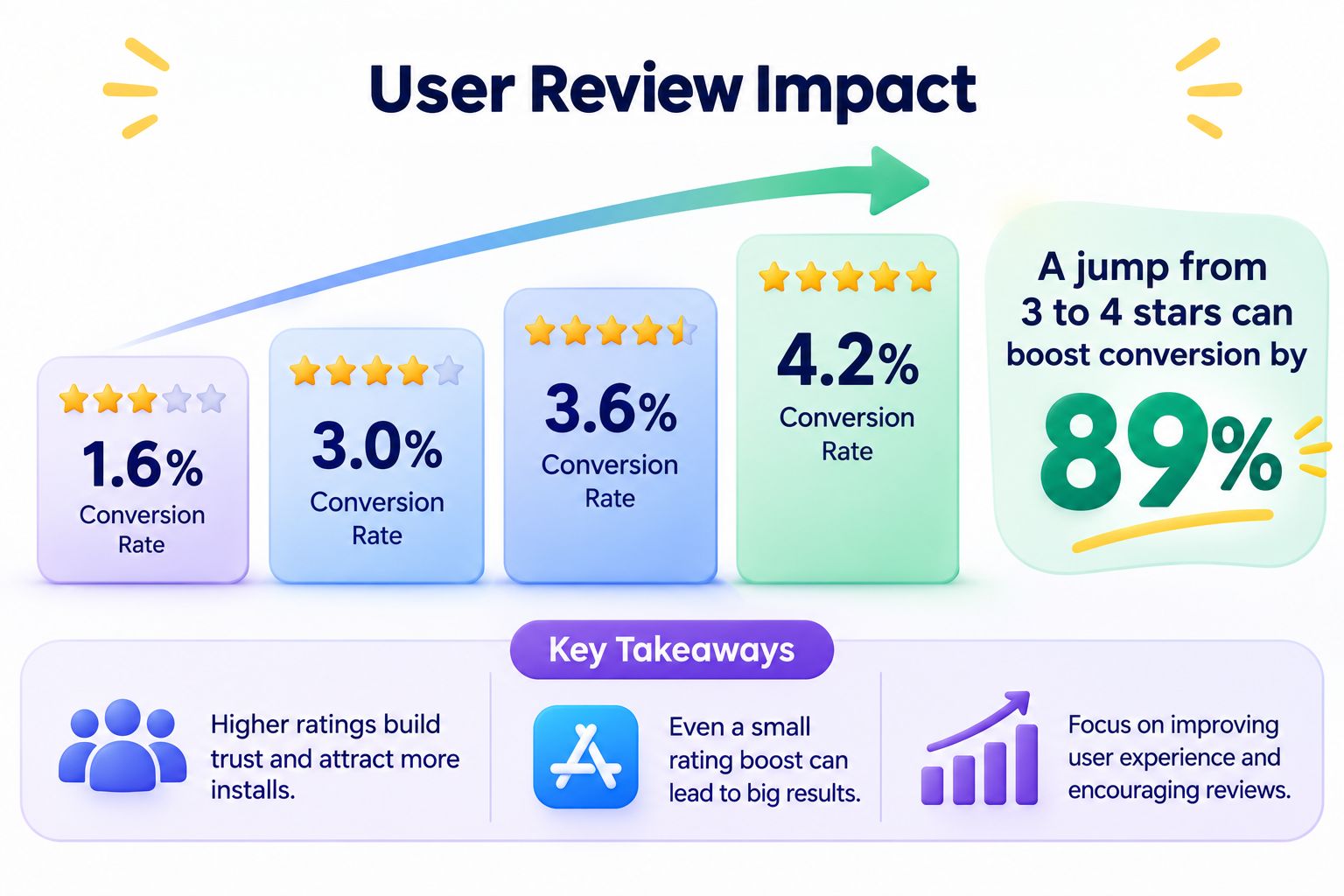
Ask for a rating via the native prompt straight after a successful session (i.e. after the workout is complete).
Developer responses are the other half of review work. Apple states that the reviewer will be notified when you respond and can then update their review, and you can edit your response at any time. A 2018 study of Google Play reviews in Empirical Software Engineering found that responding tends to have a positive effect on the score that the user ultimately gives.
If you cannot reply to everything, then Apple would suggest you start with the lowest-rated reviews and those relating to technical issues with the current version. A useful reply is:
- Thank the user and name the exact problem they’d come up against.
- Say what you’ve fixed or which version the fix will ship in.
- Skip the marketing fluff and the personal bits (Apple’s guidance doesn’t allow for that).
- Points to a support contact if the issue persists.
Treat replies as part of your mobile app marketing strategy, because future visitors will be reading them as well.
Monetization models that keep app ratings and user retention intact
Ads are the default for free apps and are a very common reason for one-star reviews. A 2020 empirical study of in-app ad reviews references a survey in which just under 50% of users would uninstall an app as a result of the ads. Lower ratings lead to lower rankings, and that in turn reduces the organic funnel, which is the very basis of any mobile app marketing.
That’s why developers are looking at ad-free models in conjunction with subscriptions. One of the options is a monetization SDK: the user opts in and then shares a portion of their unused internet traffic with the developer, who gets paid. The user can turn that off in their settings at any time.
User retention and push notifications that protect lifetime value
Organic installs only deliver an ROI if you’ve got excellent user retention. Pushwoosh’s 2025 benchmarks show average Day 30 retention at 3.10% on iOS and 2.82% on Android.
Airship’s 2025 push notification benchmarks cover over 9 billion app users. The top 10% of apps in terms of pushes sent per user have seen a 72% increase in sessions per active user. The best-performing pushes are behavior-triggered (e.g. a streak reminder or a tip about a feature the user hasn’t used yet). Ask for push permission after the first success rather than on first launch and keep the number of promotional pushes to a minimum so that users don’t turn them off.
What metrics prove that your mobile app marketing strategy is working?
App marketing works when your CAC is below your LTV, and you’ve got strong retention as your installs grow.
Before you judge any channel, put the core unit economics in one place. Shopify’s 2026 guide defines an LTV:CAC of around 3:1 as good and cautions that 2:1 or below is effectively break-even. Here’s how a mobile app marketing strategy takes those figures and turns them into decisions:
| Metric | Formula | What to aim for |
| CAC | Total acquisition spend ÷ new users acquired | Keep it falling as organic installs grow |
| LTV | Average monthly revenue per user ÷ monthly churn rate | Comfortably above CAC |
| LTV:CAC | LTV ÷ CAC | Around 3:1; 2:1 or lower is close to break-even |
| Payback period | CAC ÷ average monthly revenue per user | Months, not years, for a self-funded app |
Then track the signals that move those numbers week to week:
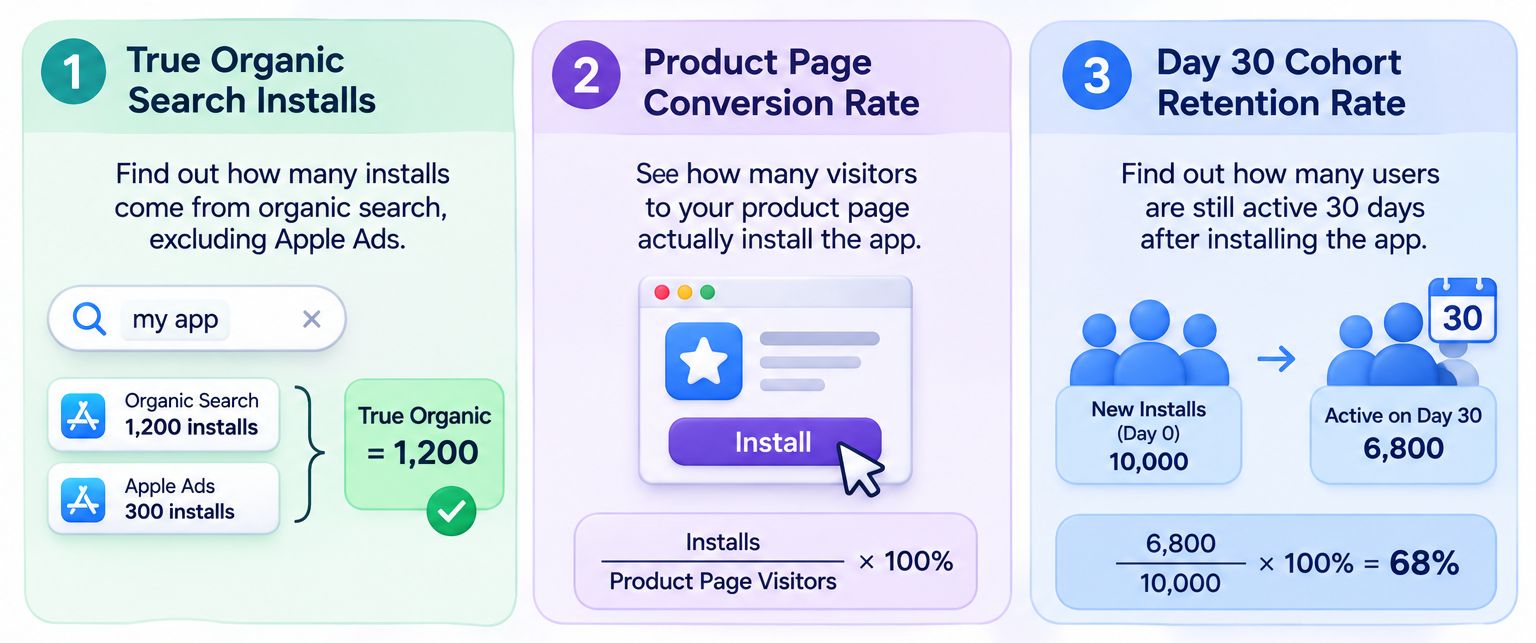
- Authentic organic search installs: just strip out the Apple Ads installs (which App Store Connect counts as App Store search).
- Product page conversion rate: compare it before and after each screenshot test.
- Day 30 cohort retention: check this after every release, since a bad update will obviously have a negative impact on your reviews and retention.
Where indie developers should start: a 90-day organic app growth plan
For a solo dev, the most sensible mobile app marketing strategy is a linear one, and you can run it once from start to finish in 90 days.
- Weeks 1-2: fix stability. Get crash and ANR rates under Google Play’s bad behavior thresholds. Then record your baseline conversion rate and your Day 30 retention.
- Weeks 3-6: rebuild the listing. Rewrite the indexed fields around one position and ship the benefit-led screenshots with the next release.
- Weeks 7-10: protect the rating. Time the review prompts to success moments. Answer every low-star review. Swap the intrusive ads for a lighter model. Track the trend weekly.
- Weeks 11-13: go beyond the stores. Publish the landing page with schema and deep links, then run your AI visibility prompts to establish a baseline.
On day 90, compare CAC against LTV for each channel. Take the next quarter’s hours and put them into the channel with the best ratio. Then re-run the same mobile app marketing strategy with your next release.
Frequently asked questions about mobile app marketing and organic installs
These answers cover timing, paid ads, review prompts, policies, websites, and localization.
How long does it take for a mobile app marketing strategy to start delivering organic results?
Expect weeks or months, not days. On iOS, keyword and subtitle changes only go live with a new app version, so each test cycle is at least one release. Ratings are the first to react, then a stability fix and another round of review prompts.
Should a mobile app marketing strategy include paid ads at launch?
Yes, as small tests. If an app has very few installs (or zero installs and therefore zero reviews), then a small exact-match Apple Ads campaign will tell you which search terms are converting and can then be fed into your organic keyword work.
How often can a developer actually get users to rate their app on iOS and Android?
The iOS native prompt can show up to three times over the course of 365 days, and the system will determine whether or not it actually appears. Google Play’s In-App Review API also has a time-bound quota, so a call to it does not necessarily mean that the dialog appears.
Is opt-in bandwidth sharing permitted in Google Play and the App Store?
Both stores only approve it if it fits with their existing policies, and app reviewers make the final decision, so no SDK vendor can guarantee it will be approved. If you’re using opt-in bandwidth sharing, you’ll generally need a standalone consent screen with equal accept and decline buttons. You also need to disclose it in your privacy policy, in the Data Safety section of your Google Play listing, and in the App Privacy section on the App Store.
Do indie apps need a website as part of a mobile app marketing strategy?
Yes, a single page makes a huge difference. A landing page is the only listing you have complete control over. It can rank for the very problem queries that app marketplaces themselves don’t show. It can have the SoftwareApplication schema and a Smart App Banner. It can be a source that AI assistants can cite. Without it, Google will predominantly show you the marketplace page and roundups written by others. Start with one page that’s built around your position and then progressively add in guides and comparison content as your mobile app marketing strategy develops, and you start to understand which queries are actually converting.
How many languages should an indie app’s listing support at launch?
A mobile app marketing strategy should start off far smaller than you’d think. Start in your primary language, and then see which of the countries that you’re already sending organic installs to don’t need any localization at all, and localize those first. App Store Connect takes metadata in 50 languages, and Google Play allows up to 50 custom listings by country, so the limit is really your time rather than the platforms. Do keyword research in each language rather than just translating your English list, and add one or two markets per release so you can actually measure the impact of each.
